1. What is PM3K?
PM3K is a service for centrally managing publishing across multiple TikTok accounts from one place.
You can connect multiple TikTok accounts to a single PM3K workspace, use a shared media library, create and schedule posts, track their status, and manage everything through either the Dashboard or the REST API .
PM3K can be used in two main ways:
- Dashboard — connect TikTok accounts, upload media, create and schedule posts, and track their status;
- REST API — integrate PM3K with your own application, script, or automation service.
PM3K uses the official TikTok OAuth flow. Your application does not need to store TikTok access tokens. External REST API access uses a separate PM3K API key.
In the API, posts are organized into batches. A batch contains one or more individual publishing tasks. Each task is called a target and is associated with a specific TikTok account.
2. Getting Started
2.1. Signing in to PM3K
Open PM3K and click Connect TikTok or Sign in.
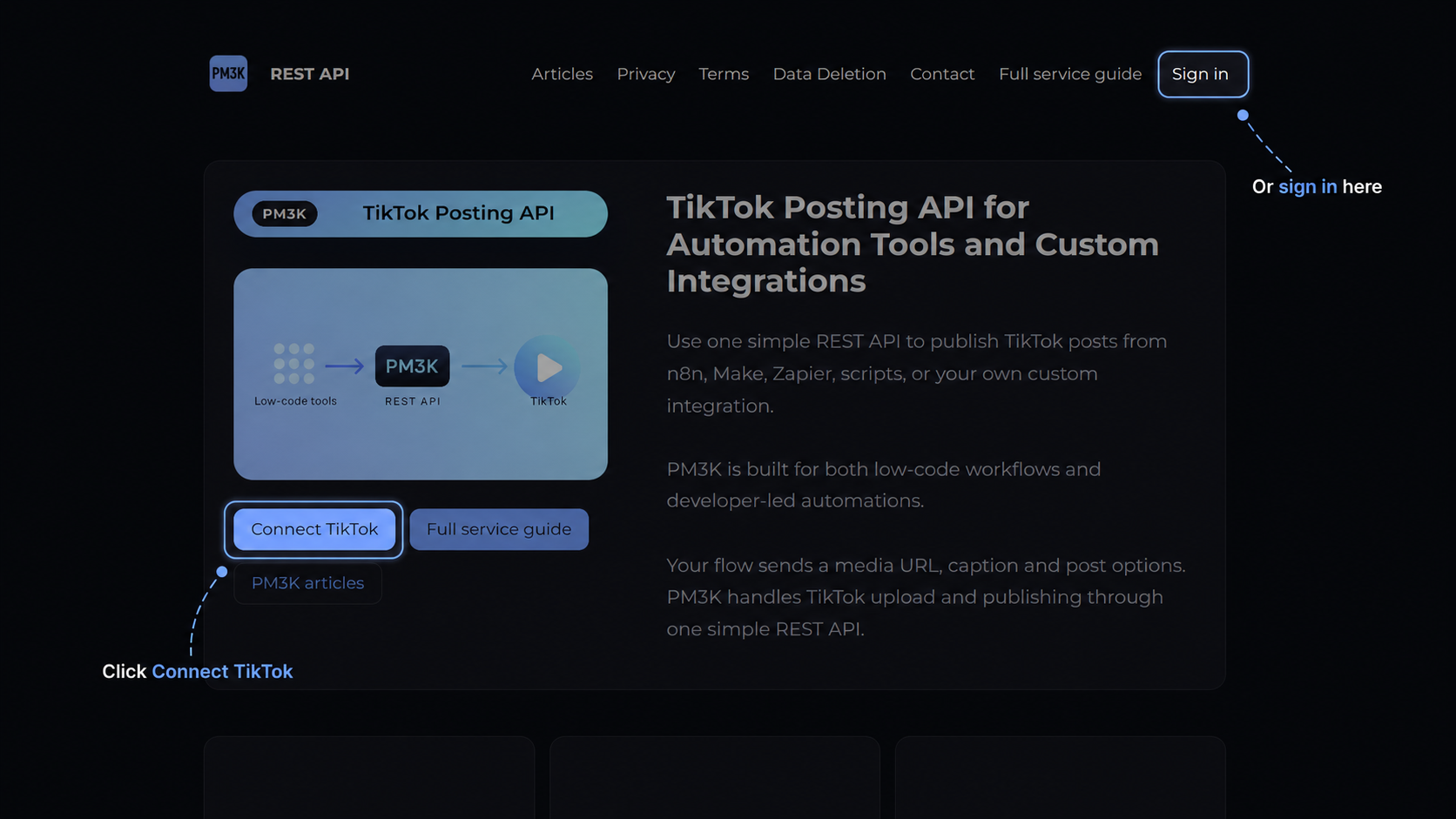
The official TikTok authorization screen will open. Sign in to the TikTok account you want to use and approve the requested permissions.
After successful authorization, PM3K will create your workspace, and the TikTok account you used will become the first account connected to that workspace.
Later, you can connect additional TikTok accounts. In the Dashboard, click Connect TikTok account and complete the TikTok OAuth flow using the account you want to add.
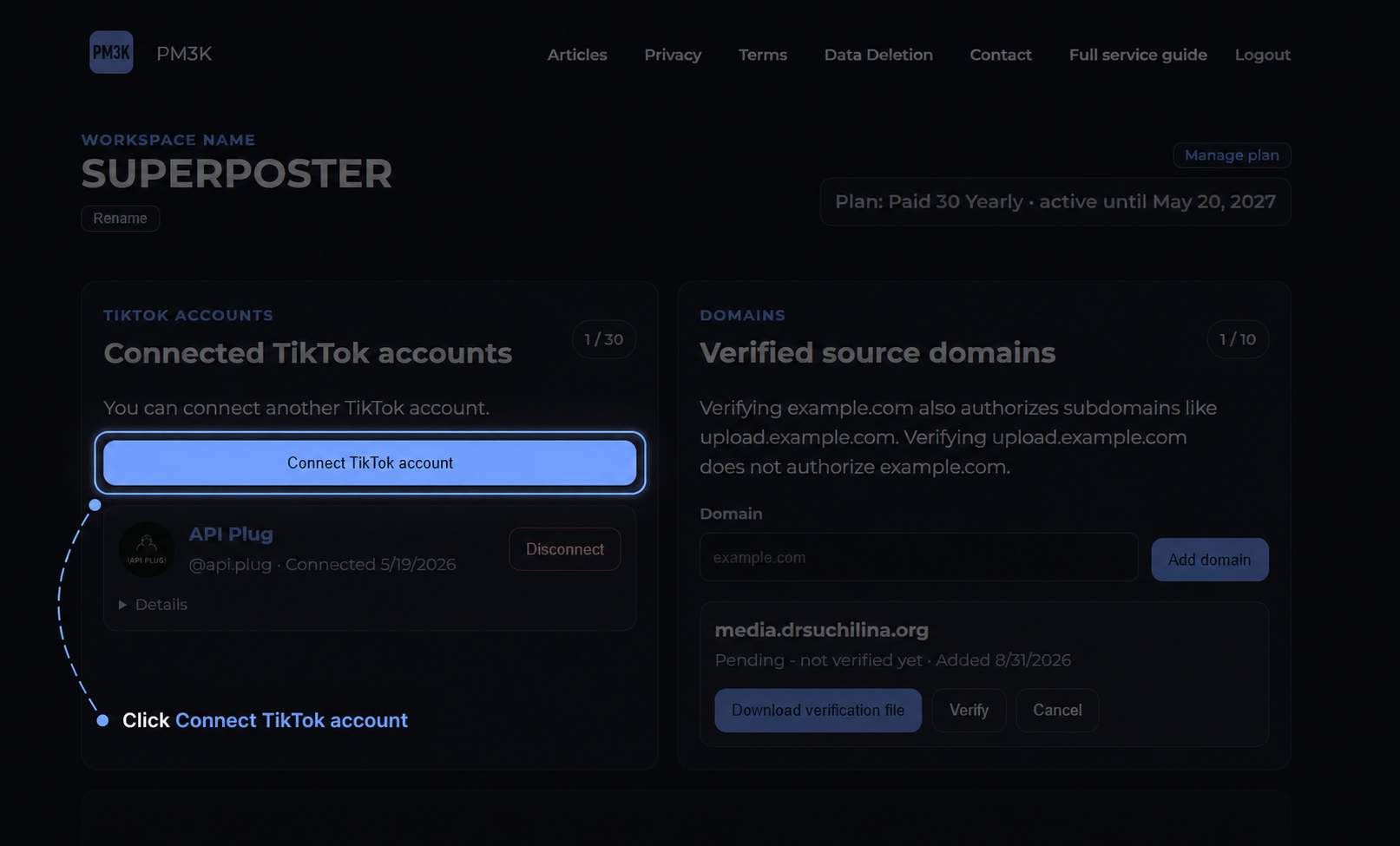
The number of TikTok accounts that can be connected at the same time depends on your plan.
A TikTok account cannot be connected to two different PM3K workspaces at the same time. If the account is already connected to another workspace, disconnect it there first.
3. Dashboard
The Dashboard is the main interface for managing PM3K.
Workspace
The name of your workspace is displayed at the top of the Dashboard.
You can change it using the Rename button.
This is only a display name. Renaming the workspace does not affect the API, connected TikTok accounts, posts, billing, or any other settings.
Connected TikTok accounts
This section contains the TikTok accounts connected to your workspace.
Here you can:
- connect a new TikTok account;
- view all currently connected accounts;
- open Details for a specific account to see additional account information, including its PM3K
account_id; - disconnect an account;
- see how many accounts are currently connected and the maximum allowed by your plan.
If an account already has an active post in queued, retry_wait, running, submitted, or publishing status, it cannot be disconnected.
First cancel any posts that are still cancelable, or wait until the active publishing process is complete.
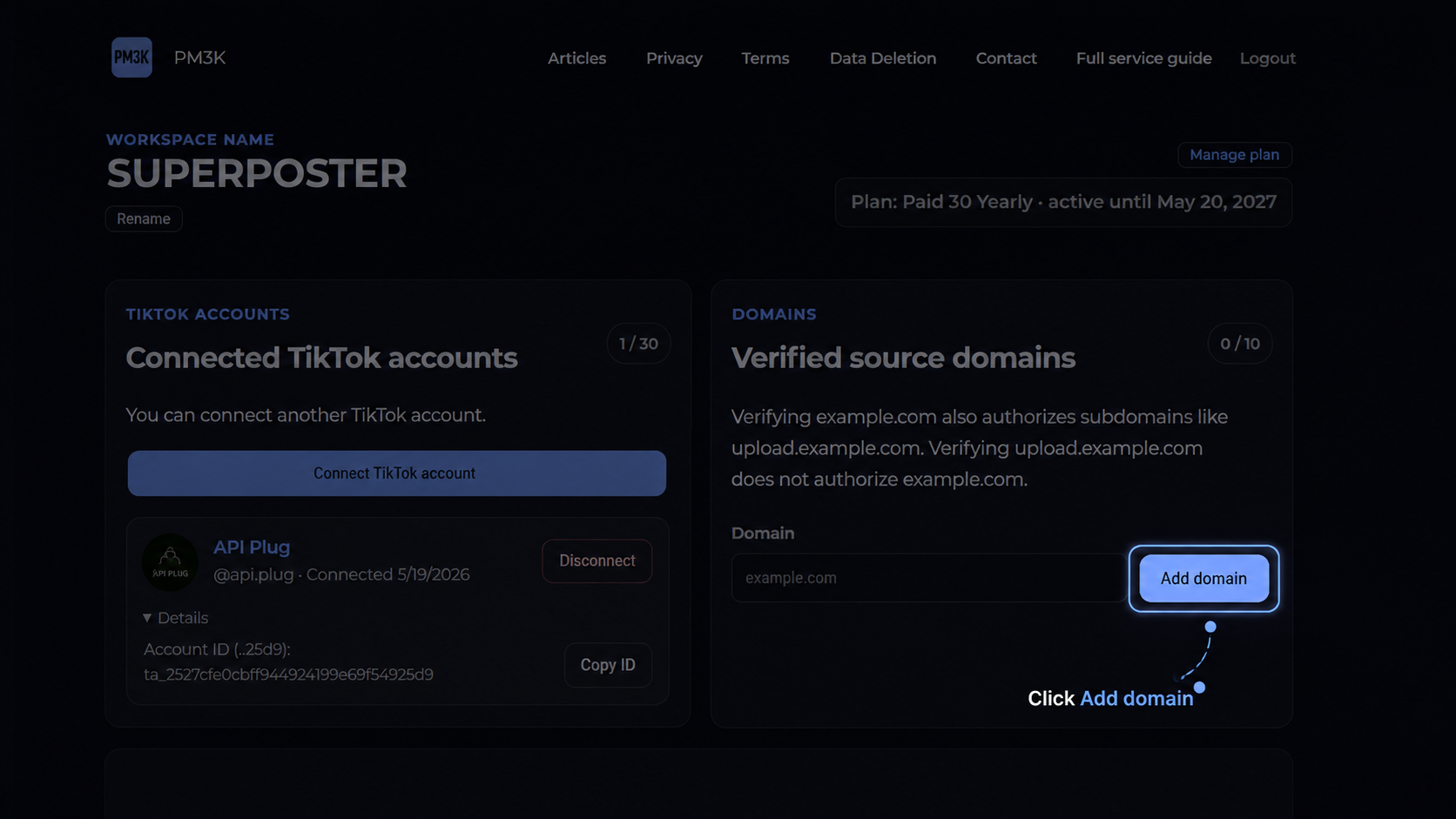
Verified source domains
This section is used to add and verify domains from which PM3K is allowed to retrieve your media files.
For example:
media.example.com
After the domain is verified, you can use media URLs hosted on it, such as:
https://media.example.com/videos/video-001.mp4Domain verification is required for custom source_url values hosted on your own server, CDN, or object storage.
The verification process is described in detail in the Verified source domains section.
External API access
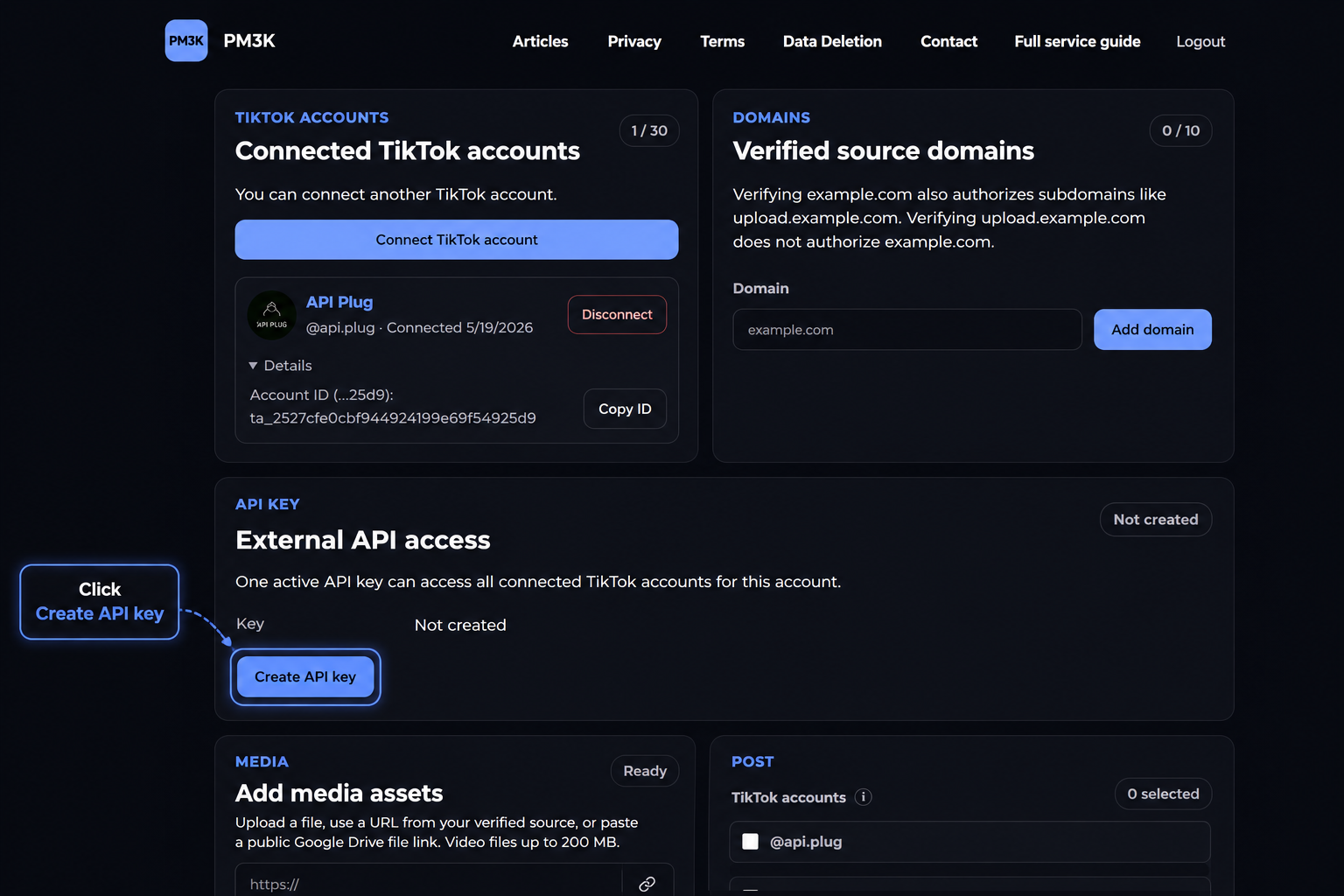
This section is used to create an API key for external integrations and your own applications.
The full API key is shown only once, immediately after it is created or rotated. Save it in a secure location.
Do not publish the key or place it in client-side JavaScript, public URLs, or public repositories.
If the key is lost, it cannot be displayed again. Use Rotate key to create a new one.
After rotation, the previous key stops working and is replaced with the new key.
You can also disable the key completely using Revoke.
Legacy API key compatibility is described in the API key and legacy integration compatibility section.
Add media assets
A media asset is a video or a set of photos stored in PM3K and prepared for publishing.
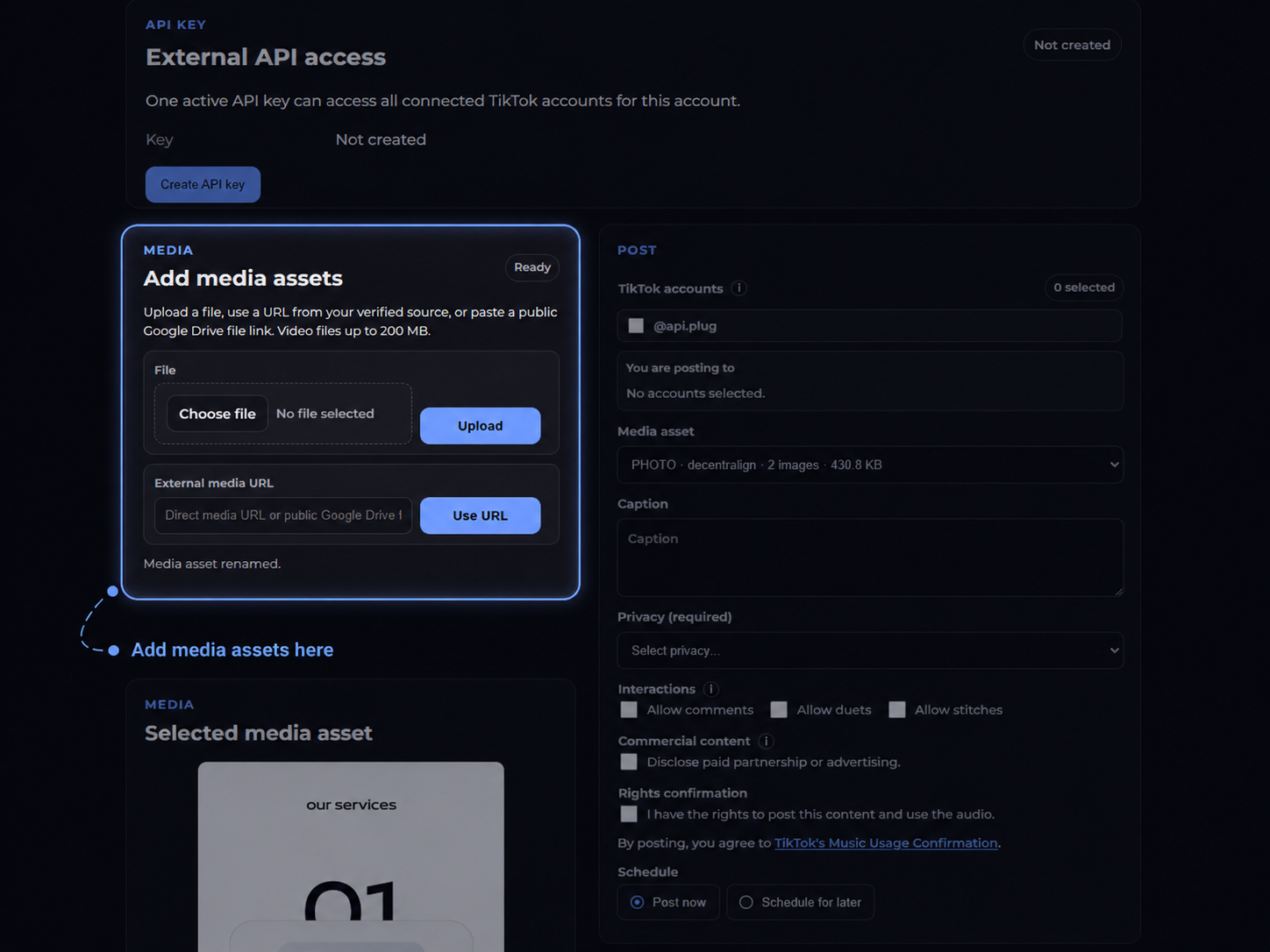
You can manually add a media asset through the Dashboard by:
- uploading a file from your computer;
- importing a file from an HTTPS URL on one of your verified domains;
- importing a publicly accessible file from Google Drive.
Media submitted through the REST API using source_url also automatically becomes a media asset and appears in your Media Library.
Media assets are stored in PM3K for a maximum of 30 days from the time they are created, after which they are automatically deleted.
Media Library
The Media Library contains all media assets in your workspace, regardless of whether they were added through the Dashboard or the REST API.
When you select an asset, its preview appears in the Selected media asset section.
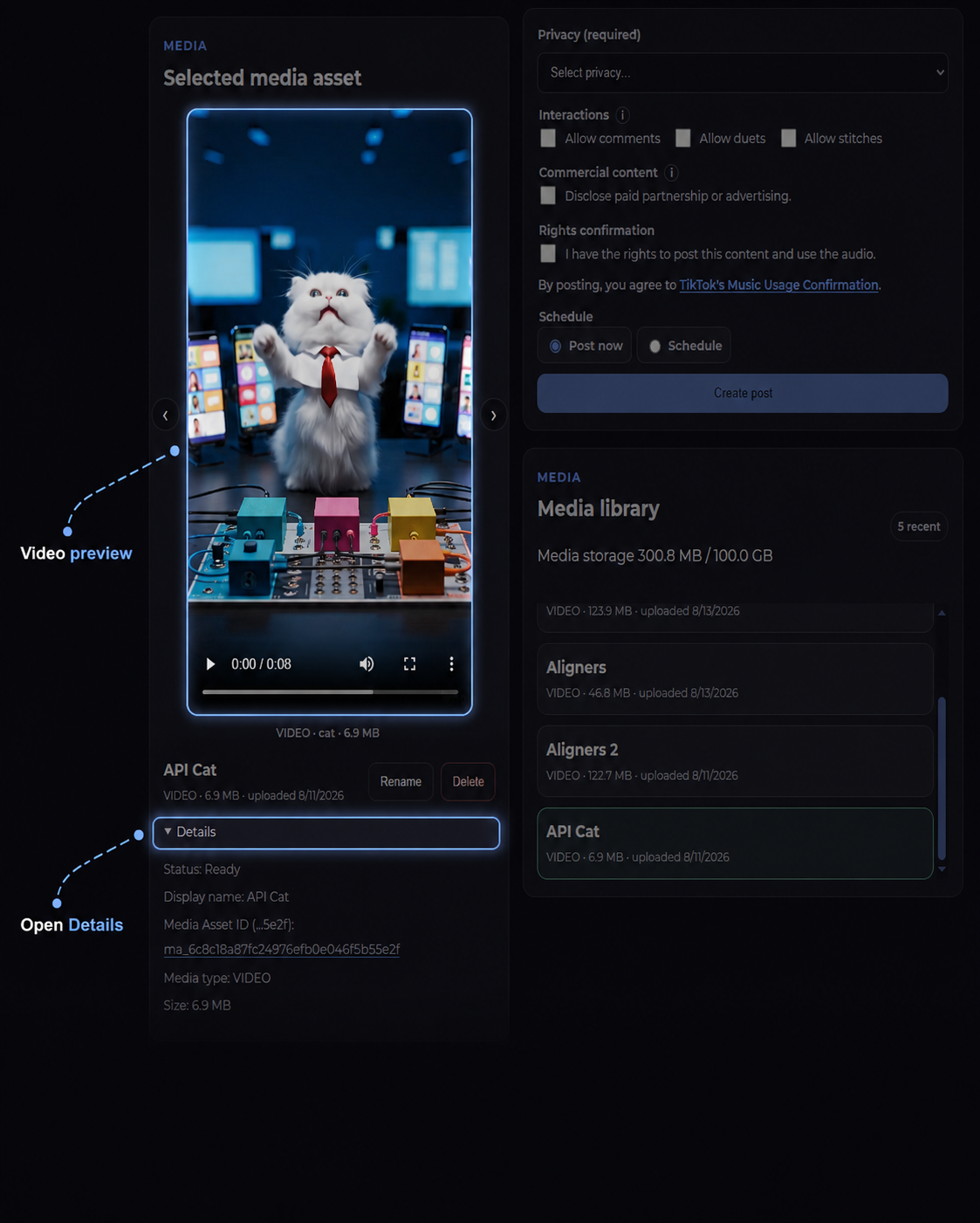
In Details, you can view:
- asset status;
- asset name;
- media type;
- file size;
- creation date;
- automatic deletion date;
- how the asset was added — upload or import;
- source host, if the asset was imported;
- the URL of the stored media;
- the publishing history of the asset;
- which TikTok accounts it was published to and when;
media_asset_id.
You can rename an asset. This is only a cosmetic change and does not affect the file, the media_asset_id, or any posts that have already been created.
Post
This section is used to create a post through the Dashboard.
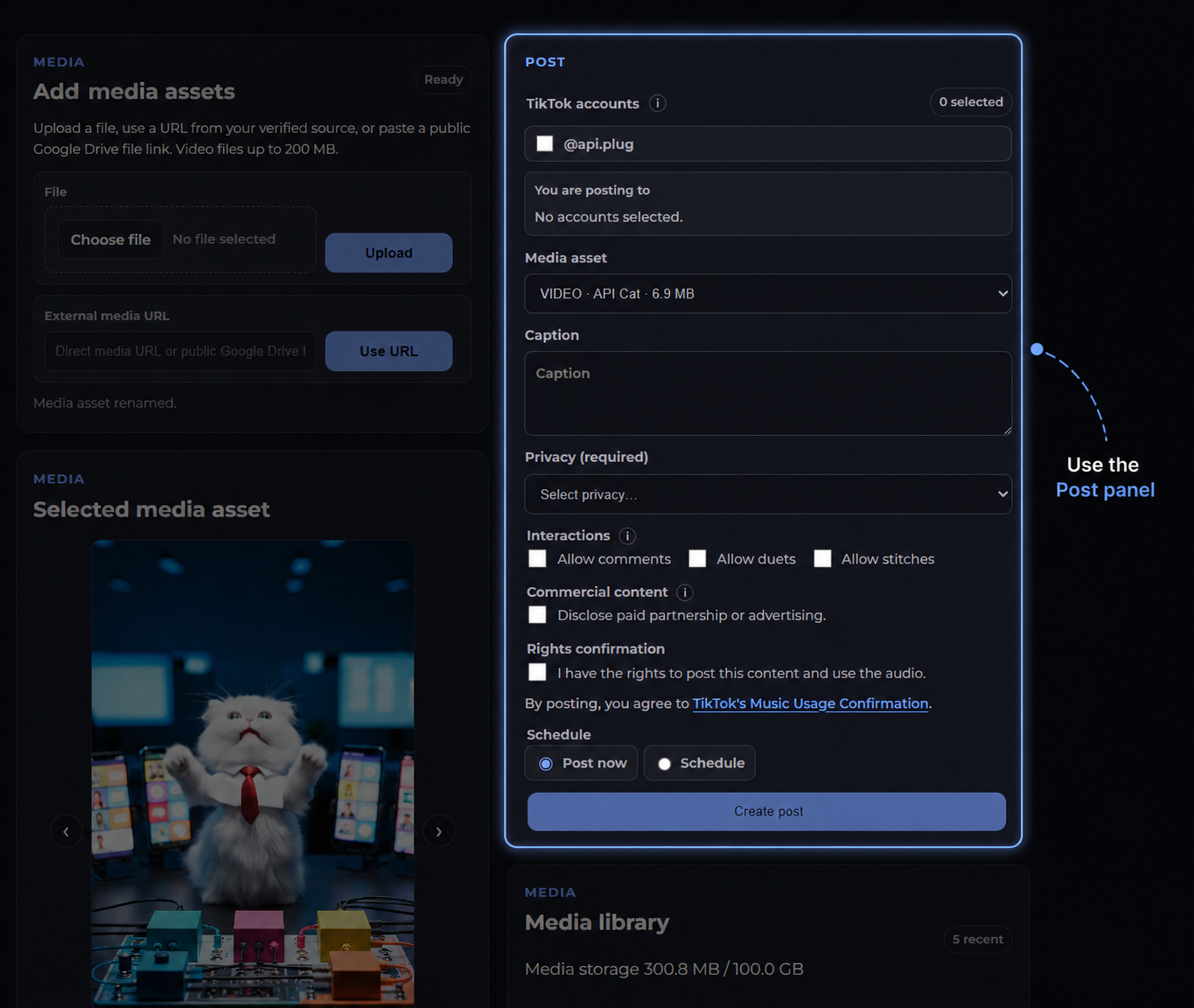
You can choose:
- one or more connected TikTok accounts;
- a media asset;
- caption;
- privacy;
- whether comments are allowed;
- whether Duet is allowed;
- whether Stitch is allowed;
- commercial content settings;
- confirmation of rights to the content and audio;
- whether to publish now or schedule the post for later.
If you select multiple TikTok accounts, PM3K will manage the publishing process for each account separately and show the status of each post in Recent post activity.
Recent post activity
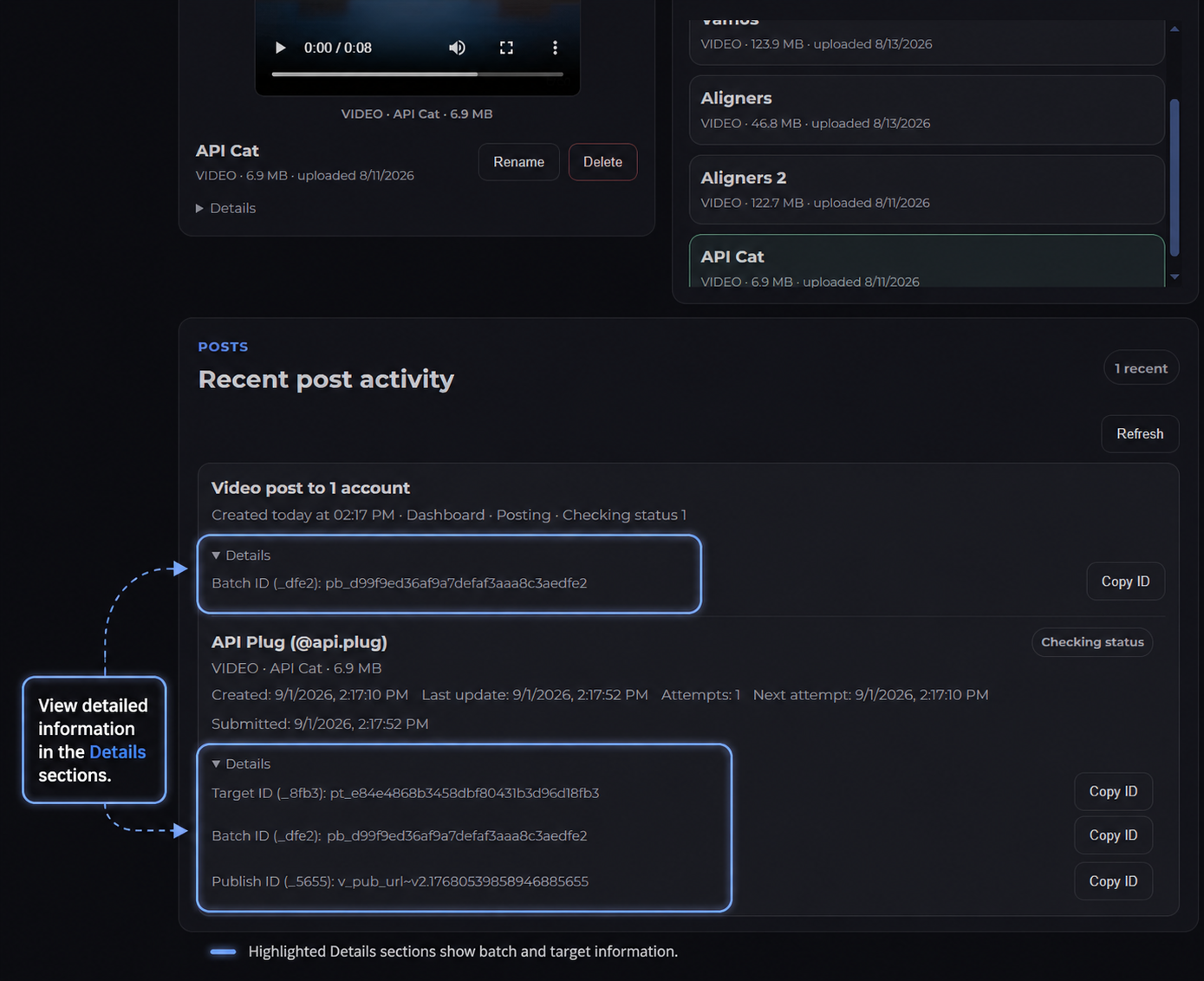
This section shows the batches you have created and their current publishing progress.
For each batch, you can see which TikTok accounts are included, the status of each post, and any publishing errors or completed results.
Completed and failed batches can also remain here as recent activity until they are dismissed.
4. Plans and Technical Limits
The number of TikTok accounts you can connect and the amount of Media Library storage available depend on your selected plan. Your current limits are shown in the Dashboard.
The following technical limits apply to all plans:
- up to 200 MB per uploaded media asset;
- up to 50 targets in a single batch;
- up to 10 TikTok posts within a rolling 24-hour period per TikTok account;
- at least 60 seconds between posts for the same TikTok account;
- media assets are stored for a maximum of 30 days from the time they are created.
The 10-post limit is applied separately to each connected TikTok account, not to the workspace as a whole.
5. Verified Source Domains
If a file is hosted on your own server, CDN, or object storage, you must verify the source domain before using its URL.
For example:
media.example.com
In the Dashboard, open Verified source domains and click Add domain.
PM3K will create a verification file.
Click Download verification file and place the file in the root of the specified domain.
It must be accessible over HTTPS at:
https://media.example.com/pm3k-domain-verification.txtThe file contents will look like this:
pm3k-domain-verification=<your-verification-token>After uploading the file, return to PM3K and click Verify.
Once verification is successful, URLs from that host can be used as media sources.
You can add up to 10 domains per workspace.
Subdomains
If you verify the root domain:
example.com
PM3K will also allow its subdomains:
- media.example.com
- cdn.example.com
The reverse does not apply.
If only the following domain is verified:
media.example.com
this does not authorize:
- example.com
- cdn.example.com
- other.example.com
Google Drive
Domain verification is not required for public Google Drive files.
You only need to provide a public link to the specific file.
For example:
https://drive.google.com/file/d/FILE_ID/view?usp=sharingThe file must be shared so that it can be accessed without signing in to a Google Account — for example, using Anyone with the link / Viewer access.
A practical check is to open the link in a private/incognito window while signed out.
Use a link to the file itself, not to a Google Drive folder.
6. Media Assets
PM3K does not pass arbitrary user-provided URLs directly to TikTok.
If you use an external source_url, PM3K first retrieves the file and stores it in its own media storage. A media asset is then created and used for publishing.
6.1. Video
Supported formats:
- MP4
- MOV
Maximum file size:
200 MB
6.2. Photos
Supported source image formats:
- JPEG
- PNG
- WebP
A single photo post can contain up to:
35 images
Maximum size per image:
20 MB
When necessary, PM3K automatically prepares PNG and other images in a format suitable for publishing.
The final photo asset used for publishing contains JPEG/WebP images.
6.3. Importing by URL
For example, you can import:
https://media.example.com/video.mp4A standard external URL must:
- use HTTPS;
- be hosted on a verified domain;
- be accessible to PM3K server-to-server;
- not require login or cookies;
- not be behind a paywall;
- return an actual media file.
HTTP redirects are not supported as a method of retrieving files from standard external URLs.
If the source_url responds with a redirect, PM3K rejects the import with the following error:
redirect_not_allowedGoogle Drive is handled separately and does not require domain verification.
7. Media Retention
A media asset is stored for a maximum of 30 days from the time it is created.
After the retention period expires, the asset can no longer be used for a new post.
If a post is scheduled in advance, the selected asset must still be valid at the time the post is actually published.
For example, you cannot upload an asset today and schedule it for a date after its 30-day retention period has expired.
In that case, PM3K returns:
media_expires_before_scheduleIf a scheduled post is created using source_url, PM3K downloads the external file immediately when the API request is made and creates a media asset.
Therefore, the external source_url only needs to be accessible when the batch is created. By the time the scheduled post is published, the original URL is no longer required because PM3K uses the previously stored asset.
8. API Key and Legacy Integration Compatibility
The API key is created in the Dashboard under External API access.
Each workspace can have one active API key.
Example format:
pm3k_v2_********************************The full key value is shown only once — when the key is created or rotated.
Save the key immediately.
If the key is lost, it cannot be recovered. Create a new one using Rotate key.
After rotation, the previous key stops working immediately.
You can also disable the API key completely using Revoke.
Legacy API keys
API keys issued before September 15, 2026 for the old PM3K API continue to work with the legacy endpoints:
POST /api/tiktok/direct_post
POST /api/tiktok/status
These legacy keys do not provide access to the new /api/v2/... endpoints.
New PM3K API keys, however, work with both the new API and these legacy endpoints.
This means that when rotating an old API key, you do not need to completely rebuild your existing integration. You only need to replace the credential with the new key; the existing URLs and request format can continue to be used.
The legacy endpoints are provided for backward compatibility only. New integrations should use the /api/v2/... API.
9. REST API Authentication
The main current API endpoints are available under:
https://pm3k.org/api/v2/For example:
https://pm3k.org/api/v2/tiktok/accounts
https://pm3k.org/api/v2/tiktok/posts/batches
https://pm3k.org/api/v2/media/assets
The API key is sent in an HTTP header:
Authorization: Bearer YOUR_PM3K_API_KEYFor requests with a JSON body, also send:
Content-Type: application/jsonA request therefore consists of three separate parts:
- URL
- Headers
- Body
For example:POST https://pm3k.org/api/v2/tiktok/posts/batchesAuthorization: Bearer YOUR_PM3K_API_KEY
Content-Type: application/jsonThe JSON below is the request body:
{
"items": []
}A GET request without a body:
curl https://pm3k.org/api/v2/tiktok/accounts \
-H "Authorization: Bearer YOUR_PM3K_API_KEY"If the key is missing, revoked, or invalid:
HTTP 401
unauthorizedIf the workspace does not have active access to the service:
HTTP 402
active_plan_requiredA single API key provides access to all TikTok accounts connected to the corresponding workspace.
10. Getting TikTok Account IDs
The API uses PM3K's internal account_id, not the TikTok username.
To get a list of connected accounts:
GET /api/v2/tiktok/accountsExample:
curl https://pm3k.org/api/v2/tiktok/accounts \
-H "Authorization: Bearer YOUR_PM3K_API_KEY"Response:
{
"ok": true,
"accounts": [
{
"id": "ta_...",
"display_name": "My TikTok",
"username": "example",
"profile_url": "https://www.tiktok.com/@example",
"avatar_url": "https://...",
"status": "active",
"connected_at_ms": 1780000000000,
"disconnected_at_ms": null
}
],
"limits": {
"connected_count": 1,
"max_connected_accounts": 30,
"can_connect_more": true
},
"subscription": {
"plan_code": "paid_30",
"billing_interval": "annual",
"service_expires_at_ms": 1800297600000
}
}The subscription object describes the workspace's current PM3K V2 service access:
plan_codeis the current PM3K V2 plan.billing_intervalis the current billing interval when applicable, otherwisenull.service_expires_at_msis the Unix epoch time in milliseconds when the current service access expires. It is not necessarily the date of the next billing charge.
When creating a post, use the value from the account's id field as account_id:
"account_id": "ta_..."For example:
ta_f31...Do not use the TikTok username instead.
You can also find the account_id in the Dashboard:
- Go to connected TikTok accounts
- select the account you need
- open Details
11. Accessing the Media Library via API
Endpoint:
GET /api/v2/media/assetsExample:
curl https://pm3k.org/api/v2/media/assets \
-H "Authorization: Bearer YOUR_PM3K_API_KEY"Example response:
{
"ok": true,
"media_assets": [
{
"id": "ma_video_...",
"media_type": "VIDEO",
"source_kind": "upload",
"status": "ready",
"canonical_source_url": "https://files.pm3k.org/uploads/v2/.../video.mp4",
"content_type": "video/mp4",
"bytes": 18426371,
"original_filename": "my-video.mp4",
"display_name": "my-video.mp4",
"item_count": 0,
"source_host": null,
"created_at_ms": 1780000000000,
"updated_at_ms": 1780000000000,
"retention_cap_at_ms": 1782592000000,
"expired_at_ms": null
},
{
"id": "ma_photo_...",
"media_type": "PHOTO",
"source_kind": "photo_album",
"status": "ready",
"canonical_source_url": "https://files.pm3k.org/uploads/v2/.../photo-1.webp",
"content_type": "image/webp",
"bytes": 2468312,
"original_filename": "photo-1.png",
"display_name": "photo-1.png + 1 photos",
"item_count": 2,
"items": [
{
"id": "mai_...",
"media_asset_id": "ma_photo_...",
"item_index": 0,
"canonical_source_url": "https://files.pm3k.org/uploads/v2/.../photo-1.webp",
"content_type": "image/webp",
"bytes": 1234567,
"filename": "photo-1.webp"
},
{
"id": "mai_...",
"media_asset_id": "ma_photo_...",
"item_index": 1,
"canonical_source_url": "https://files.pm3k.org/uploads/v2/.../photo-2.webp",
"content_type": "image/webp",
"bytes": 1233745,
"filename": "photo-2.webp"
}
],
"source_host": null,
"created_at_ms": 1779999900000,
"updated_at_ms": 1779999900000,
"retention_cap_at_ms": 1782591900000,
"expired_at_ms": null
}
],
"media_storage": {
"limit_bytes": 26843545600,
"used_bytes": 20894683,
"reserved_bytes": 0,
"available_bytes": 26822650917
}
}media_assets contains the available assets together with their type, size, status, retention information, and other metadata.
The field:
"id": "ma_..."is the media_asset_id that can be used when creating a post.
The block:
"media_storage": {}shows the storage limit, the amount currently in use, the amount temporarily reserved, and the remaining available space.
You can also find the media_asset_id in the Dashboard:
- Go to Media Library
- Select an asset
- Go to Selected media asset
- Open Details
To get information about a single asset:
GET /api/v2/media/assets/{media_asset_id}For example:
GET /api/v2/media/assets/ma_abc123...12. Batch and Target
The main endpoint for creating posts is:
POST /api/v2/tiktok/posts/batchesIt creates a batch.
A batch contains one or more independent publishing tasks called targets.
Conceptually:
Batch
├── Target
├── Target
└── TargetEach target has its own:
- TikTok
account_id; - media;
- publishing settings;
- status;
- result;
target_id.
Because each target is processed independently, one failed target does not necessarily mean that the other targets in the same batch also failed.
13. Publishing Directly from source_url
You do not need to upload a media asset through the Dashboard in advance or create one with a separate API request first.
Instead of media_asset_id, you can provide an external source_url directly.
For example:
"media": {
"source_url": "https://media.example.com/video.mp4",
"media_type": "VIDEO"
}Full example:
POST https://pm3k.org/api/v2/tiktok/posts/batches
Authorization: Bearer YOUR_PM3K_API_KEY
Content-Type: application/jsonBody:
{
"idempotency_key": "external-video-42",
"items": [
{
"account_id": "ta_123456",
"media": {
  "source_url": "https://media.example.com/video.mp4",
  "media_type": "VIDEO"
},
"post_info": {
"title": "Caption",
"privacy": "PUBLIC_TO_EVERYONE",
"audio_rights_confirmed": true
}
}
]
}For a standard external URL, its domain must already be verified through the Dashboard.
When PM3K receives this request, it:
- validates the URL;
- checks that the workspace is allowed to use the domain;
- retrieves the media file;
- creates a media asset in PM3K;
- stores it in the Media Library;
- creates the target;
- queues the post for publishing.
As a result, a source_url submitted through the API is automatically converted into a regular PM3K media asset and receives its own media_asset_id.
For Google Drive, you can similarly provide a supported public file link. Domain verification is not required for Google Drive.
13.1. Publishing PHOTO Posts from source_url and source_urls
For a single-photo post, use source_url with media_type: "PHOTO".
Example:
{
"items": [
{
"account_id": "ta_123",
"media": {
"media_type": "PHOTO",
"source_url": "https://media.example.com/photo1.jpg"
},
"post_info": {
"title": "Single photo post",
"privacy": "PUBLIC_TO_EVERYONE",
"audio_rights_confirmed": true
}
}
]
}For a PHOTO album containing 2–35 images, use source_urls with media_type: "PHOTO".
Example:
{
"idempotency_key": "photo-album-001",
"items": [
{
"account_id": "ta_123",
"media": {
"media_type": "PHOTO",
"source_urls": [
"https://media.example.com/photo1.jpg",
"https://media.example.com/photo2.jpg",
"https://media.example.com/photo3.jpg"
]
},
"post_info": {
"title": "Photo album",
"privacy": "PUBLIC_TO_EVERYONE",
"audio_rights_confirmed": true
}
}
]
}A prior Dashboard upload is not required.
PM3K validates and downloads the images when the batch request is created, creates one PHOTO media asset, preserves the order of the source_urls array, stores the asset in the Media Library, and creates one publishing target that references that asset.
The input images may be JPEG, PNG, or WebP.
Each ordinary source domain is checked independently and must be verified. Supported Google Drive links use the existing Google Drive import rules.
idempotency_key is optional, but recommended when the client may retry the request.
When an idempotency_key is supplied, PM3K protects retries and concurrent requests against duplicate album ingest and duplicate post creation for the same logical request.
Without an idempotency_key, each POST request is treated as a new logical request and may create a new media asset and post.
You cannot combine more than one of the following in the same media object:
{ "media_asset_id": "ma_..." }{ "source_url": "https://..." }{ "source_urls": ["https://...", "https://..."] }13.2. Reusing the same source_url
If the same source_url is used again within the same workspace, PM3K may reuse the existing ready media asset instead of downloading the file again.
This means that the same URL should always refer to the same media content while the existing asset is still available in PM3K.
If you replace the file on your server but keep the same URL, PM3K may continue using the previously stored version.
For example, if:
https://media.example.com/video.mp4was already imported, replacing video.mp4 on your server does not force PM3K to download it again.
To publish a new version of the file, use a different URL, for example:
https://media.example.com/video.mp4?v=2or otherwise make the source URL unique.
14. Publishing an Existing Media Asset
If the media asset is already available in the Media Library, you do not need to send the original file or source_url again.
Use its:
media_asset_id
Example of immediate publishing:
POST https://pm3k.org/api/v2/tiktok/posts/batches
Authorization: Bearer YOUR_PM3K_API_KEY
Content-Type: application/json
Body:
{
  "idempotency_key": "my-post-2026-09-01-001",
  "items": [
    {
      "account_id": "ta_123456",
      "media": {
        "media_asset_id": "ma_123456"
      },
      "post_info": {
        "title": "My TikTok caption",
        "privacy": "PUBLIC_TO_EVERYONE",
        "disable_comment": false,
        "disable_duet": true,
        "disable_stitch": true,
        "audio_rights_confirmed": true
      }
    }
  ]
}
Successful response:
{
  "ok": true,
  "batch": {
    "id": "pb_123456",
    "status": "queued",
    "total_items": 1,
    "scheduled_at_ms": null
  },
  "items": [
    {
      "id": "pt_123456",
      "account_id": "ta_123456",
      "media_asset_id": "ma_123456",
      "status": "queued",
      "scheduled_at_ms": null,
      "scheduled_for_ms": null,
      "next_attempt_at_ms": 1780000000000
    }
  ],
  "warnings": []
}
HTTP response:
201 Created201 Created means that PM3K successfully created the batch and its corresponding targets.
It does not mean that publishing to TikTok has already completed.
Immediately after creation, a target will usually have the status:
queued
Publishing continues asynchronously.
Make sure to save the following value from the response:
"batch": {
  "id": "pb_123456"
}
This batch_id is used later to check the status of the batch.
You can also find it in the Dashboard under Recent post activity.
Each target also receives its own ID:
pt_...
This target_id can be used to check the status of a specific post.
14.1. Legacy direct_post Endpoint
For compatibility with older integrations, PM3K continues to provide the following endpoint:
POST https://pm3k.org/api/tiktok/direct_postIt continues to work with both legacy API keys and new PM3K API keys.
Example:
POST https://pm3k.org/api/tiktok/direct_post
Authorization: Bearer YOUR_PM3K_API_KEY
Content-Type: application/json
Body:
{
  "source_url": "https://media.example.com/video.mp4",
  "title": "My caption",
  "privacy": "PUBLIC_TO_EVERYONE",
  "disable_comment": false,
  "disable_duet": true,
  "disable_stitch": true
}
On success, the legacy endpoint returns:
{
  "ok": true,
  "publish_id": "7153..."
}
The legacy direct_post endpoint does not accept account_id.
The post is published to the first TikTok account in the workspace — the account that was connected when the workspace was created.
If you need to explicitly select a TikTok account, use multiple connected accounts, work with batches, schedule posts, or use the Media Library API, use:
POST /api/v2/tiktok/posts/batchesThe legacy endpoint is intended primarily for backward compatibility.
15. idempotency_key
The idempotency_key field is optional, but it is recommended for automated integrations.
For example:
"idempotency_key": "order-48152-tiktok"It protects against accidentally creating a second batch when the same logical request is sent again, for example after a network timeout.
If your integration repeats the operation using the same non-empty idempotency_key, PM3K returns the existing batch instead of creating a new one.
Maximum length:
160 characters
Use each idempotency key for only one logical operation.
If idempotency_key:
- is not provided;
- is an empty string;
PM3K treats idempotency protection as disabled.
Therefore, two identical requests sent without an idempotency_key are treated as two separate operations and may create two different batches.
16. Publishing to Multiple TikTok Accounts
If a batch contains posts for multiple TikTok accounts, each account must have its own item.
For example:
{
  "idempotency_key": "campaign-2026-09-01-a",
  "items": [
    {
      "account_id": "ta_account_1",
      "media": {
        "media_asset_id": "ma_video_1"
      },
      "post_info": {
        "title": "Caption for account 1",
        "privacy": "PUBLIC_TO_EVERYONE",
        "audio_rights_confirmed": true
      }
    },
    {
      "account_id": "ta_account_2",
      "media": {
        "media_asset_id": "ma_video_1"
      },
      "post_info": {
        "title": "Caption for account 2",
        "privacy": "PUBLIC_TO_EVERYONE",
        "audio_rights_confirmed": true
      }
    }
  ]
}
A single media asset can technically be used by multiple targets.
In some cases, PM3K may return the following warning:
repeated_media
A warning does not mean that the entire request was rejected.
The same account_id cannot be used more than once within a single batch.
Error:
duplicate_account_in_batchMaximum batch size:
50 targets
17. post_info
Each item contains a:
"post_info": {}object.
It defines the TikTok publishing settings.
Caption
The caption is passed in:
"title": "My caption"title is required.
An empty value is not accepted.
Maximum length:
2200 characters
Errors:
- title_required
- title_too_long
- Privacy
privacy is also required.
Supported official values:
- PUBLIC_TO_EVERYONE
- MUTUAL_FOLLOW_FRIENDS
- FOLLOWER_OF_CREATOR
- SELF_ONLY
You can also use the following short aliases:
- public
- friends
- followers
- private
PM3K converts them to the corresponding TikTok values.
An unknown value is not automatically converted to Private.
The request is rejected with:
- invalid_privacy
- Comments, Duet, and Stitch
The API uses negative boolean flags:
{
  "disable_comment": false,
  "disable_duet": true,
  "disable_stitch": true
}
Values:
- false = allow
- true = disable
If these fields are omitted, PM3K uses:
true
by default.
This means that comments, Duet, and Stitch are disabled by default.
18. Rights Confirmation
To publish a post, you must explicitly confirm that you have the necessary rights to the content and audio being used:
"audio_rights_confirmed": trueIf this confirmation is missing, PM3K returns:
audio_rights_confirmation_requiredOnly send true if you can actually confirm that you have the required rights to the content and audio.
19. Commercial Content
The following fields are available for commercial content:
{
  "commercial_content_disclosure": true,
  "brand_organic_toggle": true,
  "brand_content_toggle": false,
  "brand": "Example Brand"
}
brand_organic_toggle is used when the post promotes your own brand, product, or service.
brand_content_toggle is used for branded content associated with a third party.
If:
"commercial_content_disclosure": trueat least one commercial content type must be selected.
Otherwise, PM3K returns:
disclosure_requires_selectionBranded content cannot be published with:
SELF_ONLY
In that case, PM3K returns:
branded_content_private_disallowedMaximum length of the brand field:
120 characters20. Scheduled Posts
To publish a post in the future, you can provide the top-level field:
"scheduled_at": "2026-09-02T18:30:00+02:00"Example:
{
  "idempotency_key": "scheduled-post-001",
  "scheduled_at": "2026-09-02T18:30:00+02:00",
  "items": [
    {
      "account_id": "ta_123",
      "media": {
        "media_asset_id": "ma_456"
      },
      "post_info": {
        "title": "Scheduled post",
        "privacy": "PUBLIC_TO_EVERYONE",
        "audio_rights_confirmed": true
      }
    }
  ]
}
scheduled_at must be an ISO 8601 datetime that includes a timezone.
For example:
2026-09-02T16:30:00Zor:
2026-09-02T18:30:00+02:00Alternatively, you can use epoch milliseconds:
"scheduled_at_ms": 1788366600000Do not provide both:
- scheduled_at
- scheduled_at_ms
in the same request.
The media asset must remain valid until the scheduled publishing time.
If source_url is used, PM3K downloads the file immediately when the batch is created, creates a media asset, and stores it in the Media Library.
Therefore, the source URL must be accessible when the batch is created, not at the future publishing time.
21. How PM3K Processes Publishing
Creating a batch and completing the actual TikTok post are two separate stages.
POST /api/v2/tiktok/posts/batches does not keep the HTTP connection open until the TikTok post has fully completed.After creation, a target will usually have the status:
queued
PM3K Runner then processes the target asynchronously by:
- taking the ready target from the queue;
- checking publishing limits;
- starting the submission to TikTok;
- receiving the TikTok publish_id;
- tracking the publishing status;
- retrying the operation where retries are allowed;
- storing the final result.
Therefore, you should not send another POST /batches request just because the post has not appeared on TikTok yet.
Full processing of a single target can take up to 10 minutes, depending on factors such as media file size, upload time, TikTok processing time, network conditions, and whether retries are required.
Use the PM3K GET endpoints to check the current status instead of assuming that a delayed post has failed.
22. Checking Batch Status
Endpoint:
GET /api/v2/tiktok/posts/batches/{batch_id}Example:
curl https://pm3k.org/api/v2/tiktok/posts/batches/pb_123456 \
  -H "Authorization: Bearer YOUR_PM3K_API_KEY"
Response:
{
  "ok": true,
  "batch": {
    "id": "pb_123456",
    "status": "running",
    "total_items": 2
  },
  "items": [
    {
      "id": "pt_111",
      "status": "succeeded",
      "publish_id": "..."
    },
    {
      "id": "pt_222",
      "status": "publishing",
      "publish_id": "..."
    }
  ]
}
The endpoint returns the batch together with its targets.
You can get the batch_id in two ways:
from the response to POST /api/v2/tiktok/posts/batches;
in the Dashboard under Recent post activity, go to Details for the relevant batch.
23. Checking an Individual Target
Endpoint:
GET /api/v2/tiktok/posts/targets/{target_id}Example response:
{
  "ok": true,
  "target": {
    "id": "pt_...",
    "batch_id": "pb_...",
    "account_id": "ta_...",
    "media_asset_id": "ma_...",
    "status": "publishing",
    "publish_id": "...",
    "tiktok_status": "...",
    "attempts": 1,
    "status_poll_attempts": 2,
    "last_error_code": null,
    "last_error_message": null
  }
}
If the target fails, the most important fields are:
- last_error_code
- last_error_message
23.1. Legacy Status Endpoint
For older integrations, the following endpoint remains available:
POST https://pm3k.org/api/tiktok/statusThe endpoint accepts the API key through Bearer Authorization and a JSON body via POST.
It is intended for checking a publish_id returned by the legacy:
POST /api/tiktok/direct_postRequest:
POST https://pm3k.org/api/tiktok/status
Authorization: Bearer YOUR_PM3K_API_KEY
Content-Type: application/json
Body:
{
  "publish_id": "7153xxxxxxxxxxxxxxxxxx"
}
Example response:
{
  "ok": true,
  "status": "PUBLISHING",
  "state": "pending",
  "fail_reason": null,
  "raw": {
    "...": "TikTok response"
  }
}
The simplified state field can have the following values:
- pending
- done
- failed
The legacy /status endpoint works with both legacy API keys and new PM3K API keys.
For the current batch API, use the GET endpoints with batch_id and target_id instead of the legacy /status.
24. Batch Statuses
A batch can have one of the following statuses.
queued
The batch has been created, but its targets have not started processing yet.
running
One or more targets in the batch are currently being processed.
succeeded
All required targets completed successfully.
failed
The batch completed unsuccessfully.
partial
Some targets completed successfully, while others did not.
canceled
The batch was canceled before its posts were completed.
25. Target Statuses
Each target has its own status.
queued
The target is waiting for its scheduled time or for processing to begin.
running
PM3K has started processing the target.
submitted
The post has been submitted to TikTok.
publishing
TikTok is still processing the post.
succeeded
The TikTok post completed successfully.
retry_wait
PM3K has temporarily delayed the next retry attempt.
When a target is in retry_wait, an external integration normally does not need to create a new target.
Continue monitoring the existing target instead.
failed
The post has permanently failed.
Check:
- last_error_code
- last_error_message
- canceled
The target was canceled before publishing completed.
26. Canceling a Target
Endpoint:
DELETE /api/v2/tiktok/posts/targets/{target_id}A post can be canceled while the target is in one of the following statuses:
queuedretry_wait
Once the target has moved to:
- running
- submitted
- publishing
- succeeded
the publishing process can no longer be stopped.
In that case, the API returns:
HTTP 409
target_not_cancelable
27. Listing Batches
Endpoint:
GET /api/v2/tiktok/posts/batchesYou can provide:
?limit=25
By default, the endpoint returns up to the 25 most recent batches.
Maximum per request:
50
The response may also include aggregated target counts grouped by status.
28. Common API Errors
A standard error response looks approximately like this:
{
  "ok": false,
  "error": "error_code",
  "message": "Human readable explanation."
}
Common errors:
| HTTP | Error | Meaning |
|---|---|---|
| 401 | unauthorized | The API key is missing, invalid, or no longer active |
| 402 | active_plan_required | The workspace does not have active access to the service |
| 403 | account_not_available | The TikTok account is not available to this workspace |
| 400 | items_required | The batch does not contain any targets |
| 400 | too_many_items | The maximum batch size has been exceeded |
| 400 | duplicate_account_in_batch | The same account_id is used more than once in the batch |
| 400 | invalid_idempotency_key | The idempotency_key is invalid |
| 403 | domain_not_verified | The source_url uses a domain that has not been verified |
| 400 | source_fetch_failed | PM3K could not retrieve the external media file |
| 400 | redirect_not_allowed | The external URL returned an HTTP redirect |
| 413 | too_large | The external file exceeds the allowed size |
| 413 | upload_too_large | The uploaded file exceeds the allowed size |
| 404 | media_asset_not_found | The asset does not exist or is not available to this workspace |
| 400 | media_asset_expired | The asset retention period has already expired |
| 400 | media_expires_before_schedule | The asset will expire before the scheduled publishing time |
| 400 | title_required | The caption is missing or empty |
| 400 | title_too_long | The caption exceeds 2200 characters |
| 400 | privacy_required | No privacy mode was provided |
| 400 | invalid_privacy | An unknown privacy value was provided |
| 400 | audio_rights_confirmation_required | Rights to the content and audio were not confirmed |
| 400 | disclosure_requires_selection | Commercial disclosure is enabled without selecting a commercial content type |
| 400 | branded_content_private_disallowed | Branded content cannot be published as SELF_ONLY |
| 404 | target_not_found | The target was not found |
| 409 | target_not_cancelable | The target has already passed the point where it can be canceled |
If a target has the status:
failed
always also check:
- last_error_code
- last_error_message
These fields may contain a more specific reason for the TikTok rejection or a later PM3K processing failure.
29. Minimal REST API Integration
For a minimal integration, you only need to:
Get the account_id
GET /api/v2/tiktok/accounts
Create a post
POST /api/v2/tiktok/posts/batches
You can provide source_url directly, so creating a media asset with a separate request in advance is not required.
Check the status
GET /api/v2/tiktok/posts/batches/{batch_id}
If necessary, you can also check a specific target:
GET /api/v2/tiktok/posts/targets/{target_id}If your media URLs are hosted on your own server, CDN, or storage, verify the domain once in the Dashboard.
Store the API key as a secret in your backend or automation tool.
Do not place it in:
- public URLs;
- browser JavaScript;
- Git repositories;
- public logs.
30. Managing Your Subscription
Plan management is available in the Manage plan section.
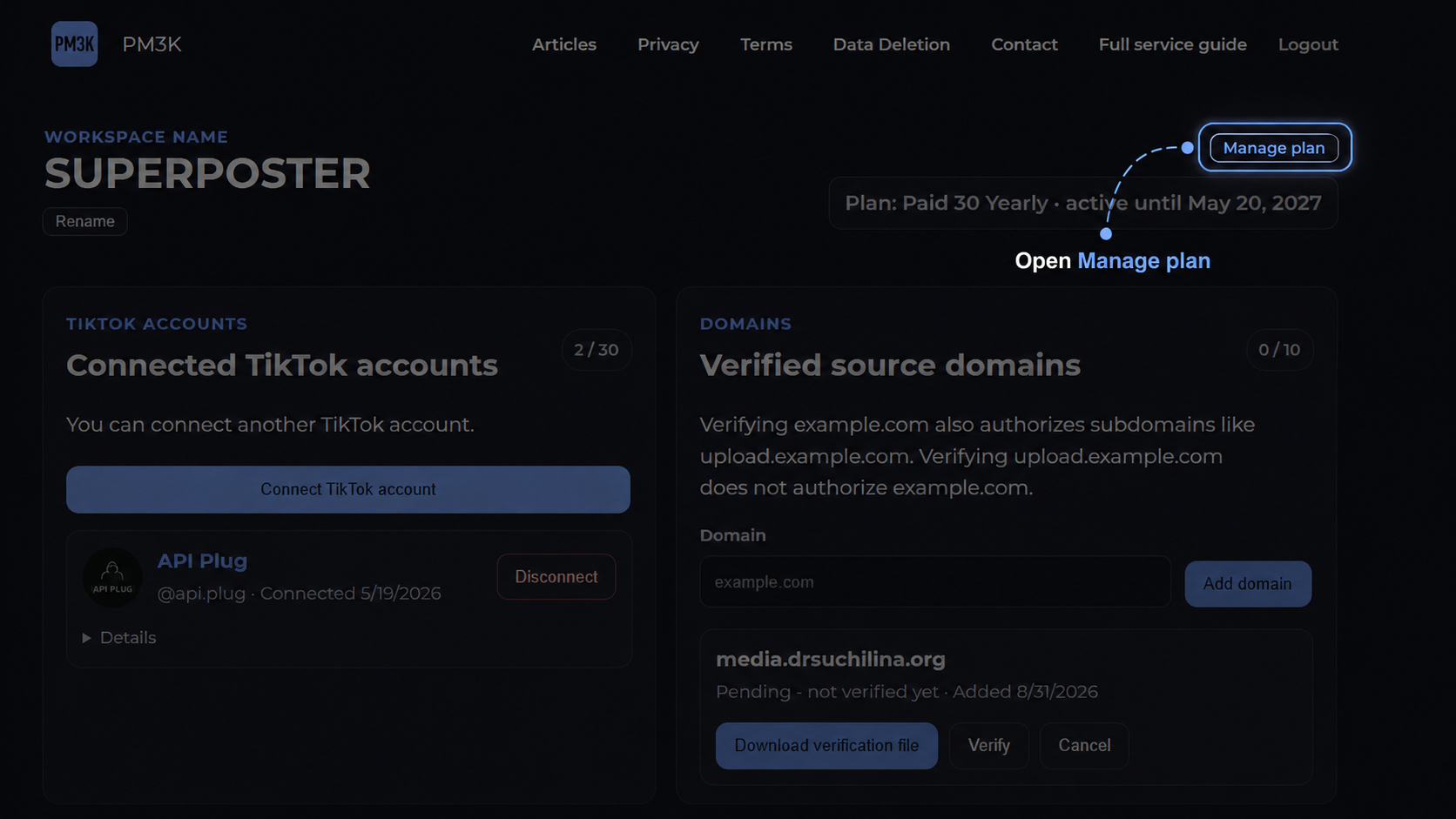
Here you can:
- start a Trial, if available;
- subscribe to Paid 5;
- subscribe to Paid 30;
- choose Monthly or Yearly billing;
- change your current paid plan;
- change the billing interval;
- cancel automatic renewal.
If a paid subscription is canceled, access does not end immediately.
PM3K continues to work until the end of the already paid billing period.
PM3K does not apply prorated charges or credits within the current billing period.
Your current plan remains active until the next billing cycle.
After the next successful payment at the new price, the new plan becomes active.
31. Deleting Media Assets
A media asset cannot be deleted while it is required by a target in queued, retry_wait, running, submitted, or publishing status.
After an asset is deleted, its media objects are removed from PM3K storage and it can no longer be used for new posts.
Manual deletion does not change the general retention rule:
a regular media asset is stored for a maximum of 30 days.
After the retention period expires, it is deleted automatically.